New: recurring client check-ins & individual portal brandingExplore product updates

Using 360Onboard
as a social media agency.

Collect the brand files and the Facebook, Instagram, TikTok, and LinkedIn access in one onboarding flow. Embed the content calendar in the portal, get each week approved, and review reels on the video itself.

For social media management and content studios.

Sample workflow

Your agency runs social for Acme & Co. You need Facebook and Instagram access, the brand files, a calendar the client can see, and a weekly approval that actually happens.

A
Follow Acme & Co.One client. One connected workflow.
01

Start with the clients you already have.

Connect Claude or ChatGPT to 360Onboard and tell it to move your clients over from Kitchen, Agency Handy, Flowlu, or FuseBase. Or send one onboarding link and let a new client add themselves.

Explore ai & automation
Northstar Studio
Acme & Co.
Claude360Onboard connected

Move my clients over from Kitchen into 360Onboard.

On it. I’ll read your Kitchen clients and create them in 360Onboard.

Read clientsKitchen
12 found
Create clients360Onboard
12 created
Carry over detailsContacts and notes
Done
12 clients imported. Ready to onboard.
Also fromAgency HandyFlowluFuseBaseor send one onboarding link
Illustration of bring clients in for Acme & Co..
02

Get the brand files before you design a single post.

Send one onboarding link. The client signs, pays, answers a short questionnaire about voice and audience, and uploads logos, photos, and brand guidelines in the same flow.

Explore client onboarding
Northstar Studio
Acme & Co.
02030405

Make yourself at home.

Share the files we’ll post with.

Your feed starts here.Logos, product photos, and brand guidelines.
Acme & Co. brand assets.zipUploading · 12.4 MB
Illustration of onboard in one flow for Acme & Co..
03

Ask for the Page and the Instagram account with the steps built in.

Request the Facebook Page and Instagram account through Meta, and use guided steps for TikTok, LinkedIn, and Pinterest. The client follows the instructions and you see what was shared.

Explore platform access
Northstar Studio
Acme & Co.

Share Meta business access

Follow the steps. Keep your team moving.

Confirm access
One less thing to chase.
Illustration of get account access for Acme & Co..
04

Embed the calendar. Ask for one approval a week.

Embed your Notion or Google Sheets content calendar on the client’s portal home. Give the client a recurring weekly task to approve the posts, so Friday never depends on a reminder.

Explore client management
Northstar Studio
Acme & Co.
Acme & Co.
Social media

Good work, in motion.

To do 2

Social mediaApprove this week’s posts
SNAcme & Co.
PublishingSchedule Friday’s reel
JMAcme & Co.

In progress 2

Client approvalReview the October calendar
JMAcme & Co.
ContentShoot product photos
SNAcme & Co.

Done 1

PlanningAgree on content pillars
JMAcme & Co.
Another step forward.
Illustration of keep the calendar in the portal for Acme & Co..
05

Comments land on the exact second.

Share the reel in the portal. The client comments at the moment they mean, draws on the frame if they need to, and approves the final cut. Each new version keeps the earlier notes.

Explore feedback & approvals
Northstar Studio
Acme & Co.
Launch reel.mp4Acme & Co. · Version 3
In review
ACME & CO.

Room
to grow.

Thoughtful things.
Made for everyday living.

Launch reel · 00:1200:00 / 00:30
00:30
Illustration of review reels on the video for Acme & Co..
06

Sell the retainer as a subscription.

Offer the social media retainer as a monthly service. The invoice goes out and gets paid by card every month without you touching it.

Explore client management
Northstar Studio
Acme & Co.
Acme & Co.
Social media

Choose what comes next.

Recurring service

Social media management

Posts, reels, and community, month after month.

  • 12 posts a month
  • 4 reels a month
  • Weekly approvals
$950/ month
Choose this serviceSample package from Northstar Studio
Illustration of get paid, every month for Acme & Co..
Northstar Studio
Acme & Co.
Claude360Onboard connected

Move my clients over from Kitchen into 360Onboard.

On it. I’ll read your Kitchen clients and create them in 360Onboard.

Read clientsKitchen
12 found
Create clients360Onboard
12 created
Carry over detailsContacts and notes
Done
12 clients imported. Ready to onboard.
Also fromAgency HandyFlowluFuseBaseor send one onboarding link
Illustration of bring clients in for Acme & Co..
Try it in the interactive demo

The whole workflow,
on one page.

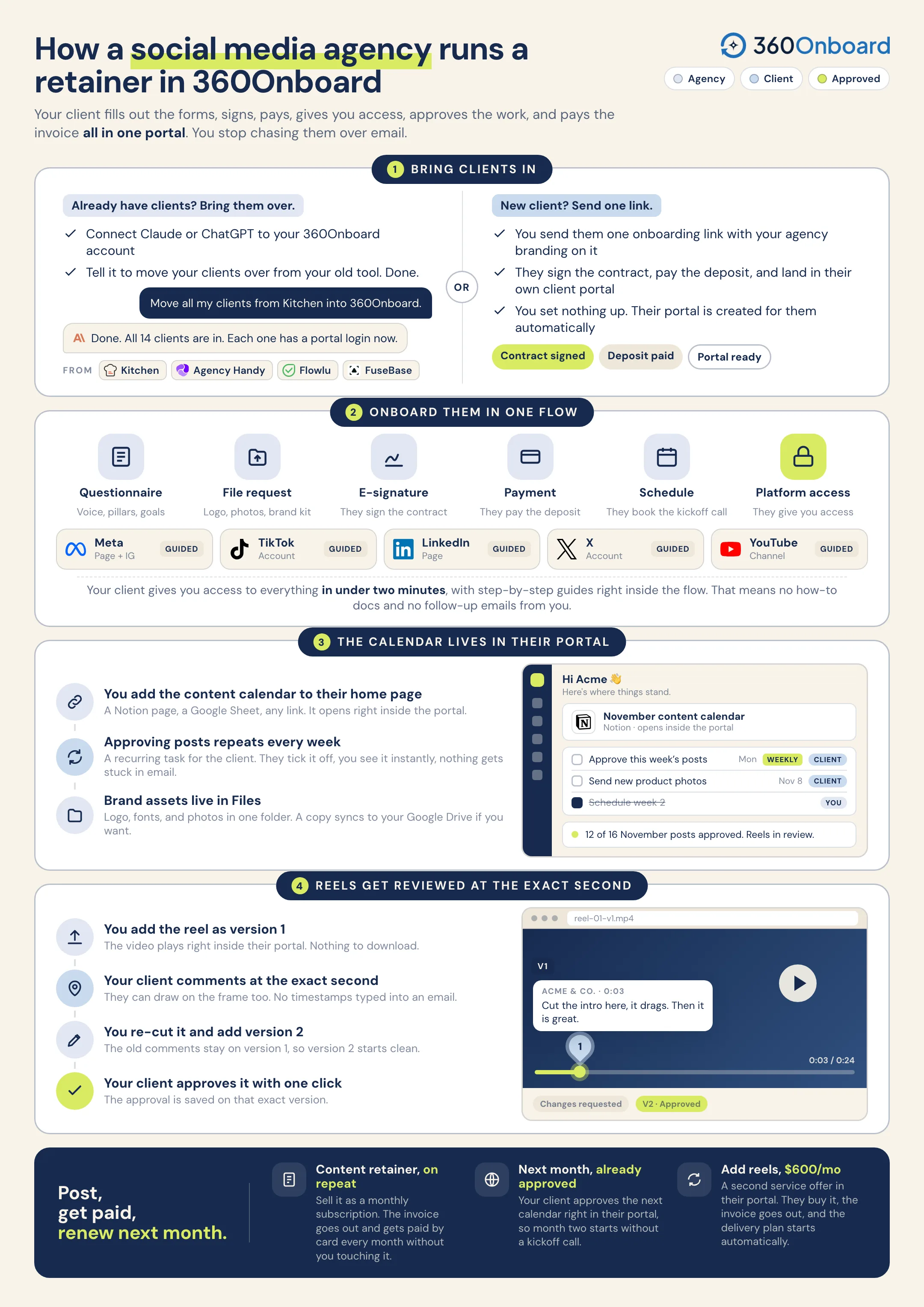
How a social media agency brings clients in, onboards them in one flow, runs the work, and gets paid. Save it, or send it to your team.

Download the one-pager
Social media agencies: the whole 360Onboard workflow on one page, from bringing clients in to getting paid.
Put your AI assistant to work

Take the next step
from Claude or ChatGPT.

Read client feedback, create tasks, work with messages, and more through MCP. Your assistant uses the workspace access you grant.

Explore AI & automation
A prompt to try“Check which of this week’s posts Acme & Co. has not approved yet and draft a short reminder for my review.”Review the proposed actions before sharing anything with your client.

Every week goes out approved.

Account access, the embedded calendar, weekly approvals, reel feedback, and the monthly invoice stay in the same portal.

Walk through your workflow

There’s more to the relationship.

Welcome a new clientManage ongoing workGet work approvedAll use cases
A CLEARER WAY TO WORK TOGETHER

Make every client
feel like your best work.

Bring the people, plans, and next steps into one shared client experience.

Start free trial
Creative director working in a sunlit studioCreative colleagues reviewing a brand direction together